

For international customers, there are two options to purchase on DUGA: Credit Card and BitCash.
The only credit cards that currently work on DUGA are MasterCard and JCB. If you own a JCB credit card, purchases are usually seamless. However, JCB cards are rarely issued outside Japan.
According to DUGA customer support, some MasterCard cards issued outside Japan may have restrictions. They’ve reported that cards from certain countries work, while others do not.
Don’t worry – even if your MasterCard doesn’t work or you use another brand of card, there’s still a solution!
In this guide, I’ll show you how to purchase items with both Credit Card and BitCash. Now follow my step and let’s make your first purchase!
Add item to your Shopping Cart
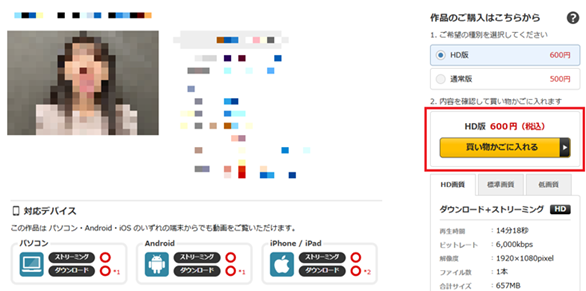
After finding an item you like, add it to your shopping cart by selecting the yellow “Add to Cart” button.
Make sure the right format (PPV, rental, HD and SD) is selected before adding to the cart.
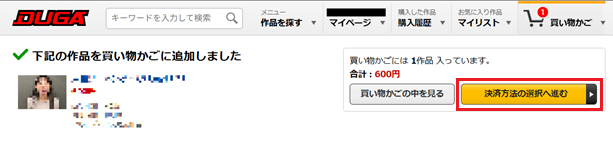
After adding, you can either proceed to “Payment selection” immediately or continue browsing – your cart will save the item for later.
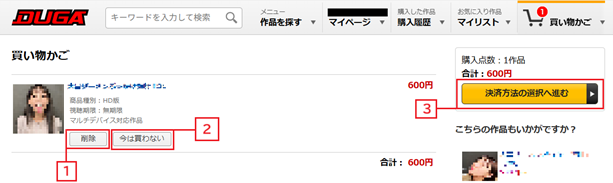
To check your cart, click the “Shopping cart icon” at the top right of the page header. From there you can:
- Delete item from shopping cart.
- Save for later (keeps the item stored for future purchase)
- Proceed to Payment Selection.
Pay with Credit Card
Currently, DUGA supports MasterCard and JCB. In the past, Visa was also accepted, but that option is no longer available and there’s no sign of return. Some international MasterCard may fail depending on the issuing country. Credit card payment is the easiest, safest, and most reliable method for repeat DUGA users.
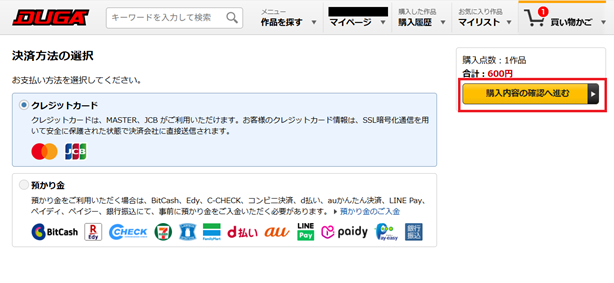
By proceeding to payment selection, you will be able to choose credit card or deposit credit. Choose Credit Card (default option). Select the “Proceed to confirm your purchase” button to continue.
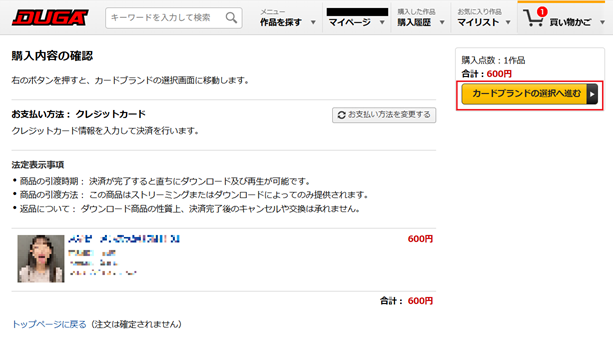
Review your order and confirm your item. There are no refunds after purchase. Continue to “Select your credit card brand”. *For second time purchase after you input your credit card information, the button will change to Confirm purchase if you have payment selected to credit card.
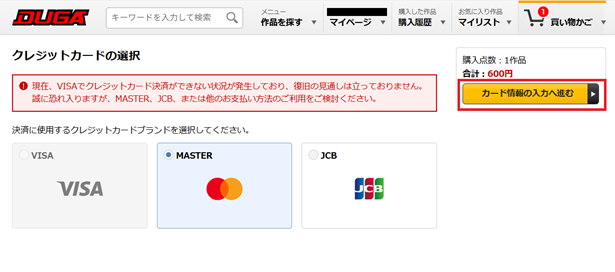
Select your credit card brand. For international users, only MasterCard is available. Continue to “Input credit card information”.
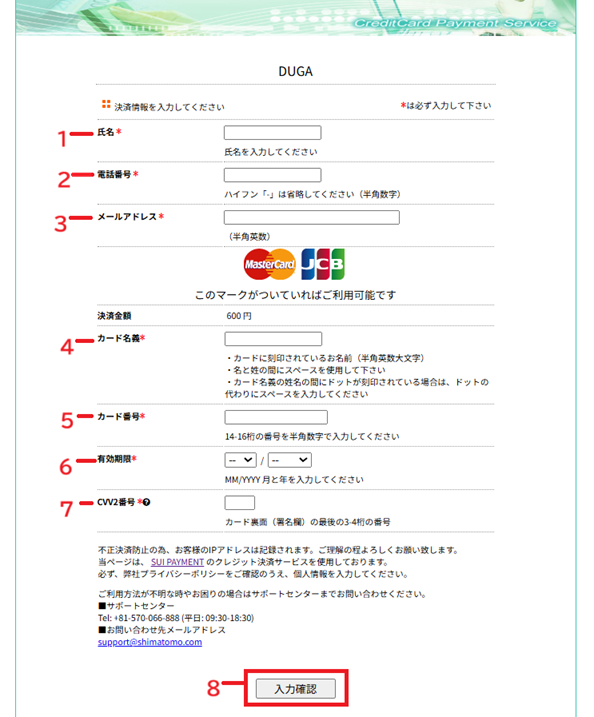
Enter your details carefully:
1. Name (No need for Hiragana or Kanji name, Roman letters are fine).
2. Phone Number (no “+” was required when I tested with random US phone number).
3. E-mail address (must match your DUGA account).
4. Cardholder Name.
5. Credit Card Number.
6. Date of Expiry (MM/YY).
7. CVV (3-digit code).
8. Review your details before confirming.
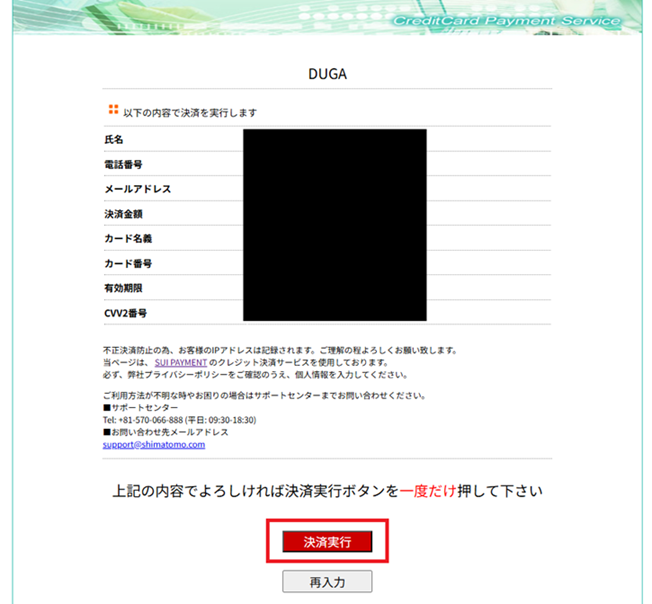
Check your input details and click the “red confirm button” to complete your payment.
Note: The first-time transaction might take a few moments to process – please wait until confirmation appears.
Before getting directed to purchase complete page you will be first sent to credit card information saved page for about five seconds.
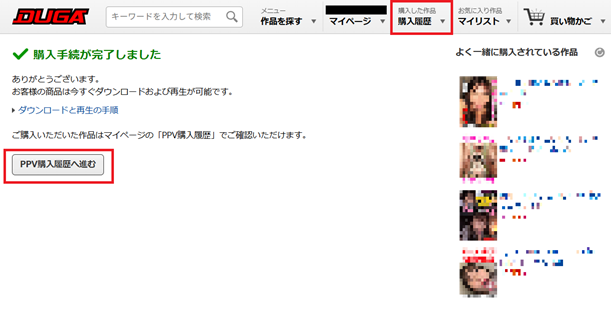
Once completed, you’ll see a purchase complete page with options to view your purchased product by selecting the Purchase History button on the Header or by clicking on the proceed to PPV purchase history button at the bottom.
Purchase with BitCash
For international users wondering “What is BitCash?”, it’s a Japanese prepaid gift card used for online purchases in certain websites – not a cryptocurrency.
In Japan, BitCash can be purchased in convenience stores, drug stores, and online through the official site. However, a Japanese phone number and address are required if you are going to buy it through the official site.
For international users, BitCash codes can be purchased through resellers like SEAGM and Play-Asia. However, buying BitCash from third-party resellers carries some risk.
⚠️ Important Safety Tips for Buying BitCash
While vendors like SEAGM and Play-Asia are generally legitimate, there are occasional reports of:
- Invalid or already-used codes
- No refund options after purchase
Tips to stay safe:
- Start with small denominations first
- Redeem immediately after purchase
- Keep your purchase receipt or transaction record
- Reed the terms and agreement
- Do your own research of user review and safety
💡 For maximum safety, using a MasterCard payment is still the most reliable method if available.
How to Use BitCash on DUGA
Your BitCash code consists of a 16-character Hiragana code (Japanese phonetic script).
Copy the code that you have obtained – it remains valid for 10 years from the resellers purchase date.
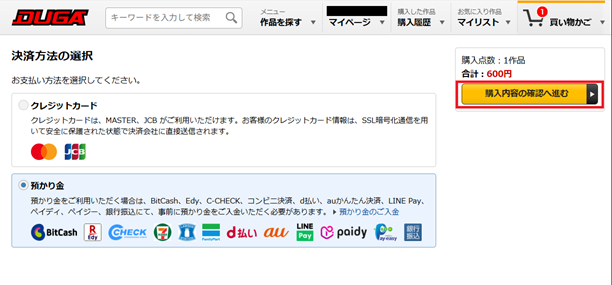
Select the bottom with the BitCash icon, purchase with deposited credit. Then continue to “Proceed to confirm your purchase”.
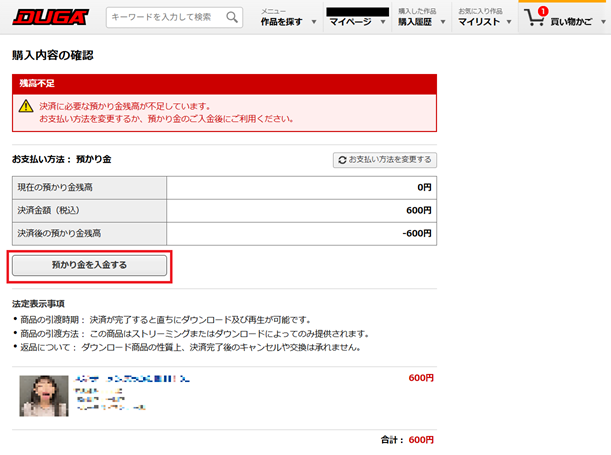
⚠️You have insufficient credit message. To deposit credit credit, click “Deposit Credit” (or go to “Deposit Payment” from your My Page dropdown).
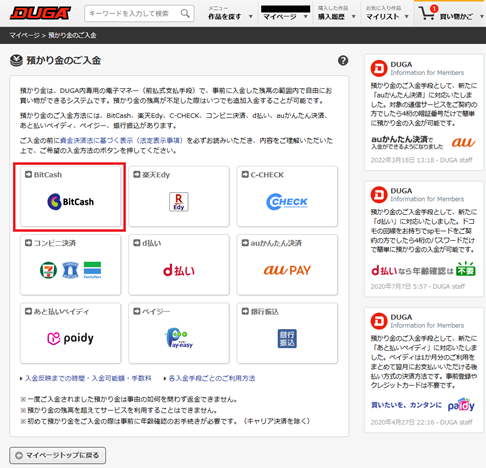
Choose BitCash as your deposit brand.
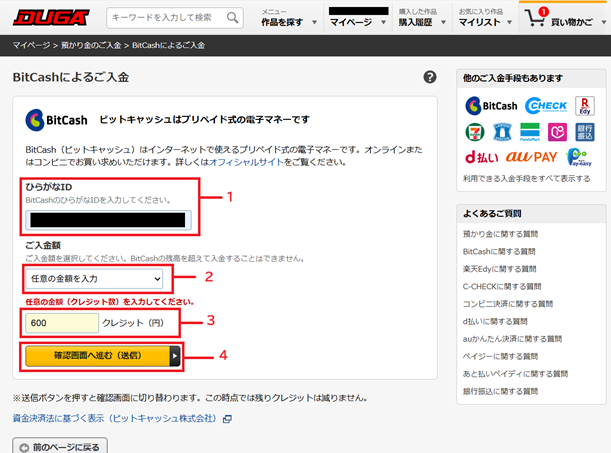
- Hiragana ID – Paste your redeemed Hiragana ID here.
- Deposit amount – You can select from 100, 500, 1000, 3000, 5000, 10000, 30000, or Enter amount of credit.
- Enter amount – If you’ve selected Enter amount at #2, you can enter amount of credit here.
- Proceed to Confirmation screen
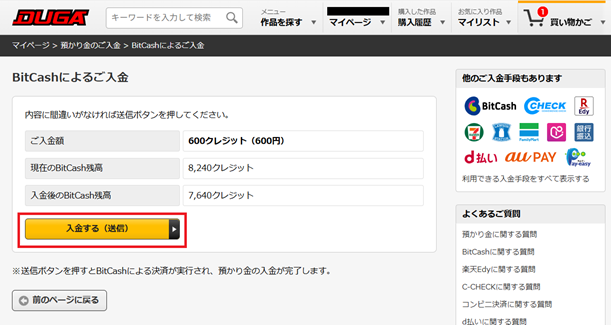
Check the detail before you deposit. In the reference image you can see the amount of deposit (600 credit), Current balance in BitCash ID (8240 credit), and balance after deposit (7640 credit).
“Deposit” to confirm.
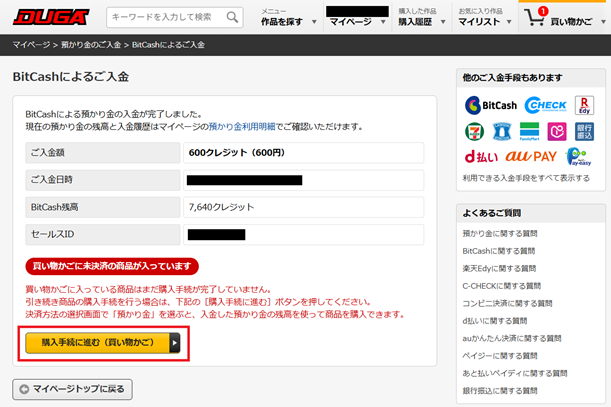
BitCash deposit confirmed page.
Go back to “Shopping cart” to proceed.
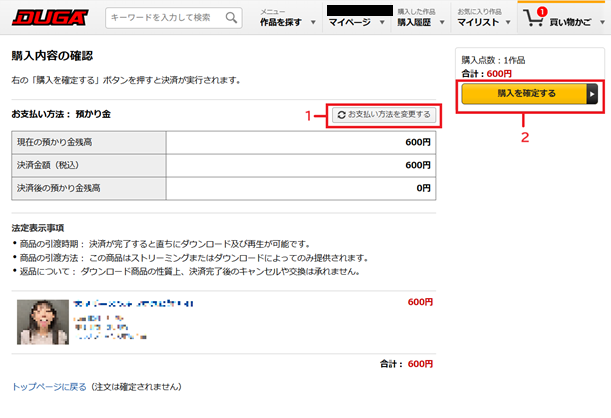
If you like to switch to payment with Credit Card select #1. #2 to “Confirm purchase”.
Your purchase is complete. You’ll see a purchase complete page with options to view your purchased product by selecting the Purchase History button on the Header or by clicking on the proceed to “PPV purchase history” button at the bottom.
To check your BitCash balance or expiration, visit the official BitCash Balance inquiry page directly.
Conclusion
Purchasing on DUGA is simple once you understand the payment methods.
If you have a JCB or MasterCard, credit card payment is the fastest and most secure option for repeat transactions.
For users without a compatible card, BitCash is a great alternative – just be careful when purchasing from third-party resellers and follow the safety tips above.
No matter which method you use, always double-check your order before confirming since DUGA does not offer refunds once payment is complete.
With this guide, you should now be ready to safely buy, stream, or download your favorite content on DUGA from anywhere in the world.